Documentation /Money
Payment methods
Settings → Payments → Payment methods lists the ways a customer can pay. Drag to reorder — the order here is the order they see — and switch each on or off.
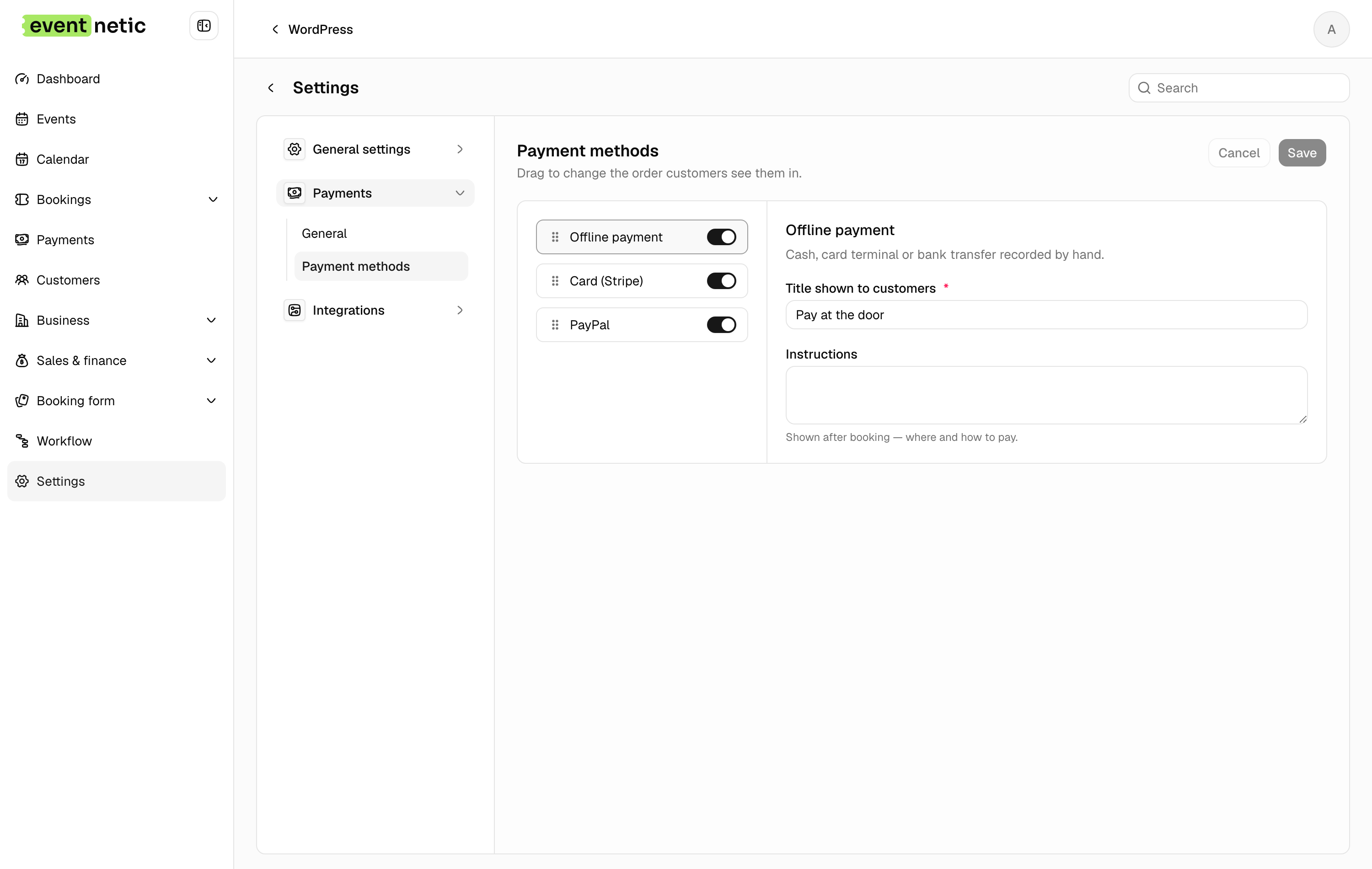
A method that has not been set up yet is marked Setup needed rather than being offered to customers half-configured.
A different set for one event
Every event offers the methods switched on here, unless it says otherwise. Open the event, go to its Settings tab and switch on Custom payment methods, then pick the ones this event accepts: bank transfer only for a trip paid weeks ahead, card only for a one-night show.
- The list has every method you have set up, including one switched off here. It is marked Off for the rest of the site and works for this event alone.
- A method marked Setup needed cannot be picked: it would take nobody's money.
- The booking form offers the event's own list, and the server refuses a booking paid any other way.
- Switch Custom payment methods off again and the event follows the site's list.
Offline payment
In the free plugin and on out of the box.
Title shown to customers : What appears at checkout. "Pay at the door", "Bank transfer", "Pay on collection".
Let customers pay a deposit : Off by default. Switch it on when this method is a bank transfer, where the money moves before the event: a ticket with a deposit then asks for the deposit only, and the confirmation page says how much to send now. Leave it off for cash at the door, where the whole amount changes hands on arrival anyway. See Currency and deposits.
Instructions : Shown on the confirmation page after booking, and in messages with the Payment instructions placeholder. Put your bank details or your door policy here.
The booking is real and the place is held; the money is recorded by you when it arrives.
Card (Stripe)
Paid feature. Needs:
- Title shown to customers — usually "Credit or debit card"
- Secret key — from your Stripe dashboard
- Webhook signing secret
Copy the Webhook URL shown on the screen into Stripe, so Stripe can tell the site when a payment completes. Without the webhook, a payment can succeed at Stripe and never be marked paid here.
PayPal
Paid feature. Needs:
- Title shown to customers
- Mode — Sandbox (testing) or Live
- Client ID and Secret
- Webhook ID
Test in sandbox first: PayPal's sandbox takes real-looking payments with fake money, which is the only safe way to see the whole round trip.
The money is yours
Whichever you use, the customer pays into your own Stripe or PayPal account. The plugin never stands between you and the money, and takes nothing per ticket.