
The Bell Room holds 104 people. Rows A to D are the stalls, level with the stage. Rows F, G and H are raised three steps behind them. There is a pillar, and four seats sit directly behind it.
Selling that room means answering four questions a capacity number cannot. Which seat did this person buy. Can four friends sit together. What happens to the bad seats. And what stops two people buying the same chair at the same second.
This is how to build it in WordPress. Every screenshot below is our theatre demo running, and you can open it and click the same buttons.
What a run costs on a ticketing platform
A three-week run in the Bell Room is eighteen performances. At 70% full that is about 1,310 tickets, and at £32 a seat it grosses roughly £42,000.
Eventbrite charges organisers 3.7% + $1.79 per ticket, then 2.9% per order to process the card. On a £32 seat that comes to about £3.90.
| One three-week run, 1,310 tickets | Platform | Your own site |
|---|---|---|
| Per ticket | £3.90 | £1.23 |
| Across the run | £5,112 | £1,609 |
| Share of the gate | 12.2% | 3.8% |
Stripe's 2.9% + 30p is not free, and a licence is £99 a year. The difference is still about £3,500 on one run, which is a set build or half an actor's fee.
The WordPress route has a cost worth knowing too. The Events Calendar sells assigned seating as an add-on to Event Tickets, and the chart builder is a hosted service. Their documentation is upfront that maps are tied to your account and your site URL, and that moving one from a staging site to production means asking their support team to do it.
For some venues that is a fair trade. It is also worth knowing before you draw a 900-seat auditorium into somebody else's system.
Step 1: the hall, drawn once
A hall is separate from an event, because the room outlives the show. Draw the Bell Room once and every production plays in it.
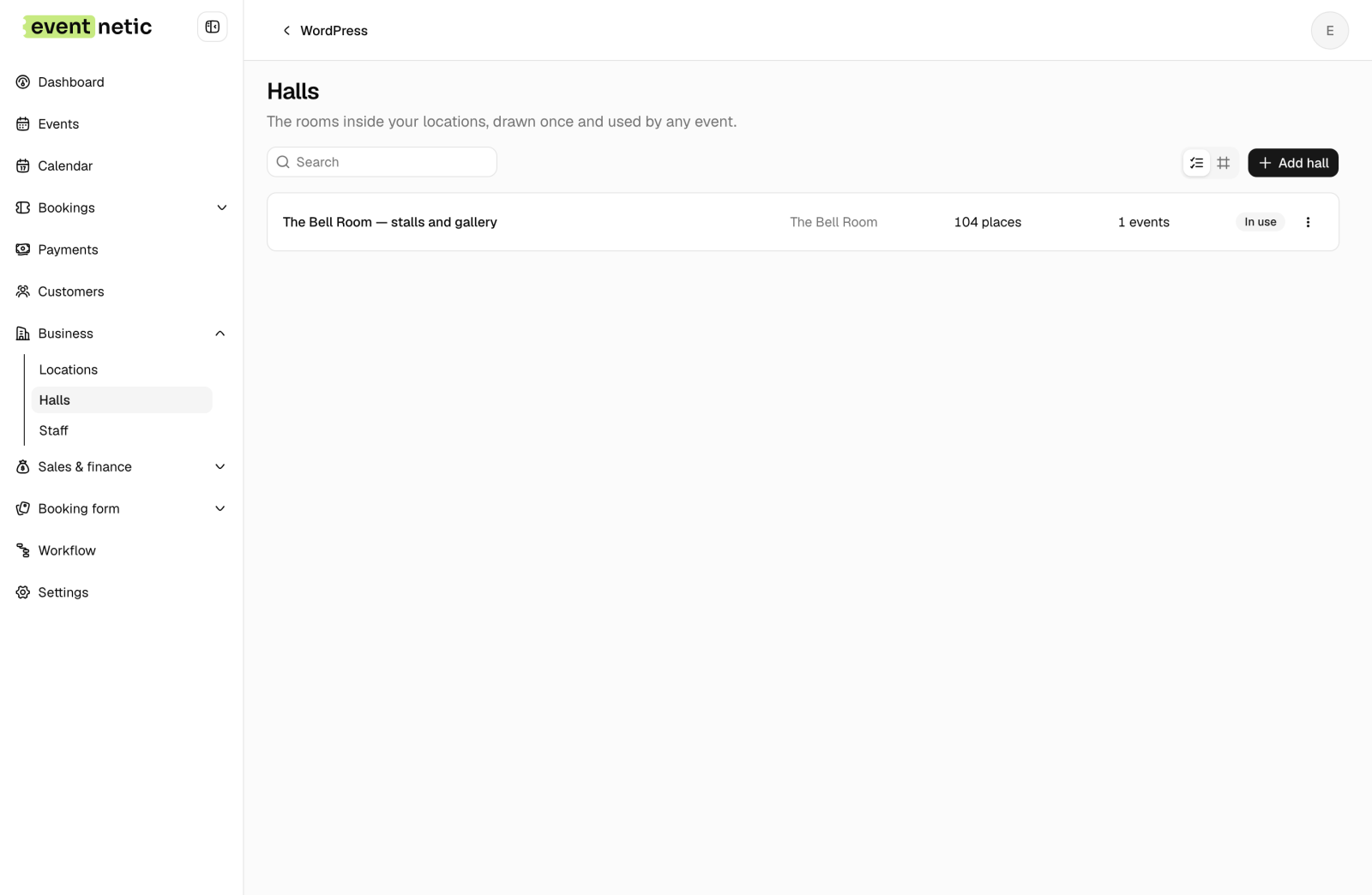
Open it and you get an editor: rows of seats, tables, labels, standing areas.
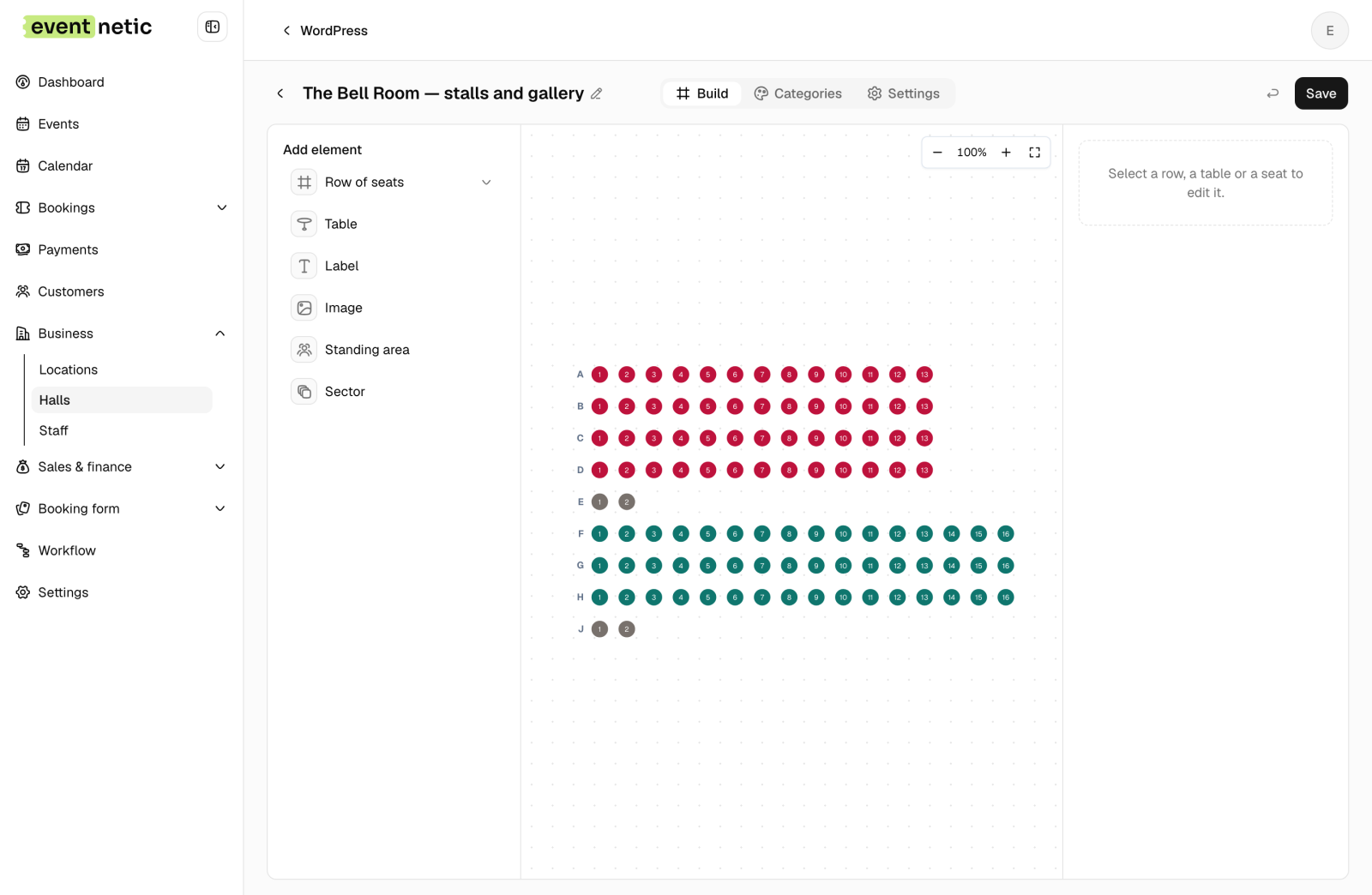
Two things in that drawing are worth stopping on, and neither is decoration.
There is no row I. Look at the labels: A, B, C, D, E, F, G, H, then J. Theatres skip I because on a printed ticket, in a dark auditorium, at speed, a capital I is a 1. An usher reading "I4" aloud starts an argument. Rows are yours to name, so name them the way your building does.
The rows are not the same width. Stalls rows hold 13 and raised rows hold 16, because the room widens as it goes back. A builder that assumes every row is equal will lie about your building, and the lie shows up at the door when somebody is standing in a seat that does not exist.
Step 2: price bands, which are not rows
The tempting mistake is to price by row. Row A costs this, row B costs that. Do not.
Price by band, and let a band collect whichever seats belong to it:
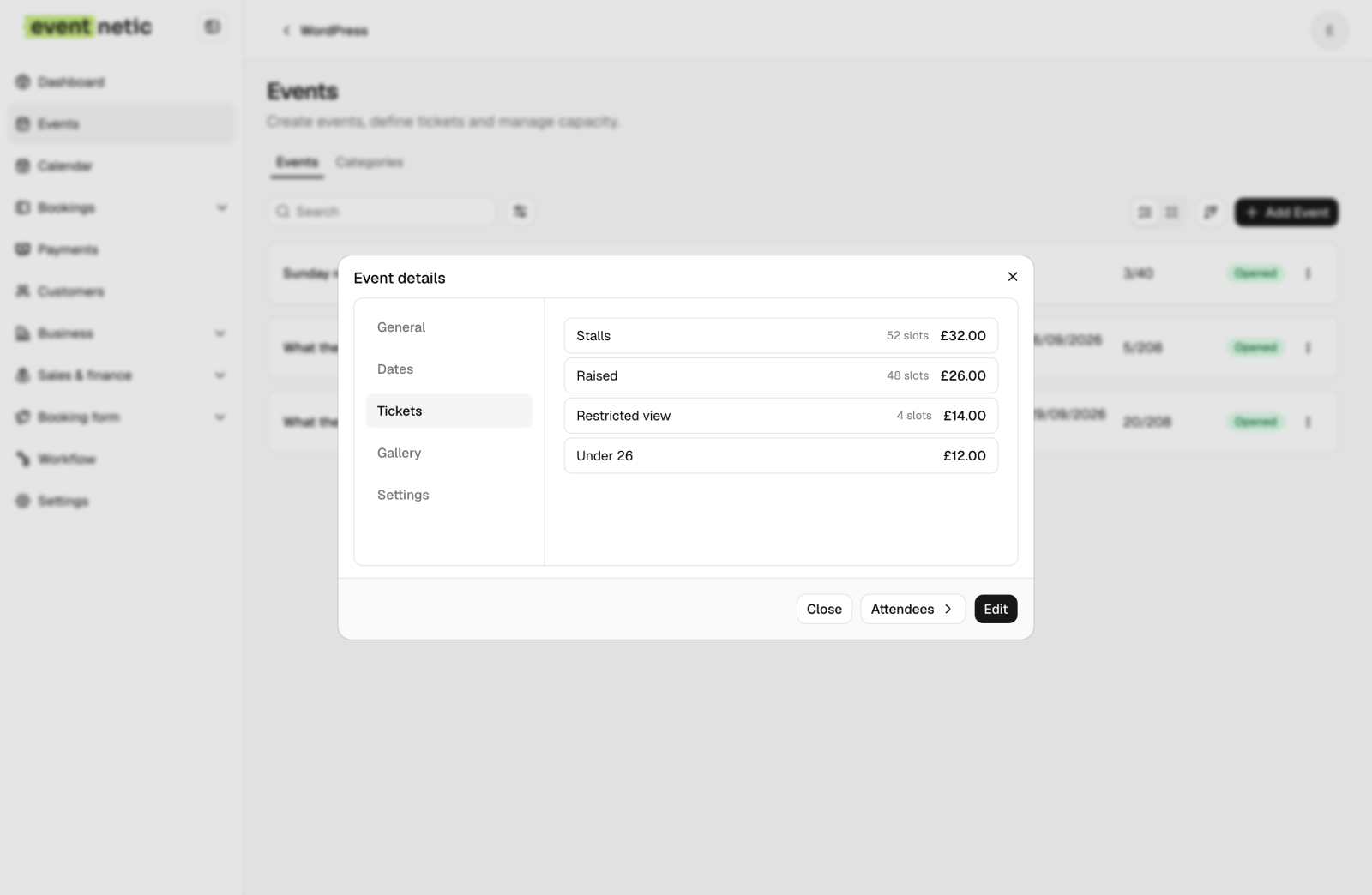
Restricted view proves the point. It is not a row. It is row E plus row J, four chairs at opposite ends of the room, joined only by the fact that a pillar is in the way. No row-based pricing can express that group. A band does it without thinking.
Under 26 is a fourth ticket with no seats of its own. It is released at noon on the day and draws from whatever is left, because a young person on a day ticket sits wherever there is a gap.
Step 3: pricing the bad seats honestly
Every real venue has them. A pillar, a speaker stack, the sharp angle where you watch the play sideways. The question is never whether you have them.
You can hide them and lose the revenue. You can sell them quietly at full price, and then have a conversation about a refund at 19:32 with the lights going down. Or you can price them and say why.
The Bell Room's four are their own band at £14 against £32, and the ticket says:
E1, E2, J1 and J2. There is a pillar. We are telling you now rather than at the door.
Students take them. People who want to see the play more than they want to see all of it take them. Nobody arrives feeling cheated, because nobody was. They are capped at two per order, because four cheap seats are exactly what a reseller takes in one click.
Step 4: what the customer sees
This is the whole build, from the other side:
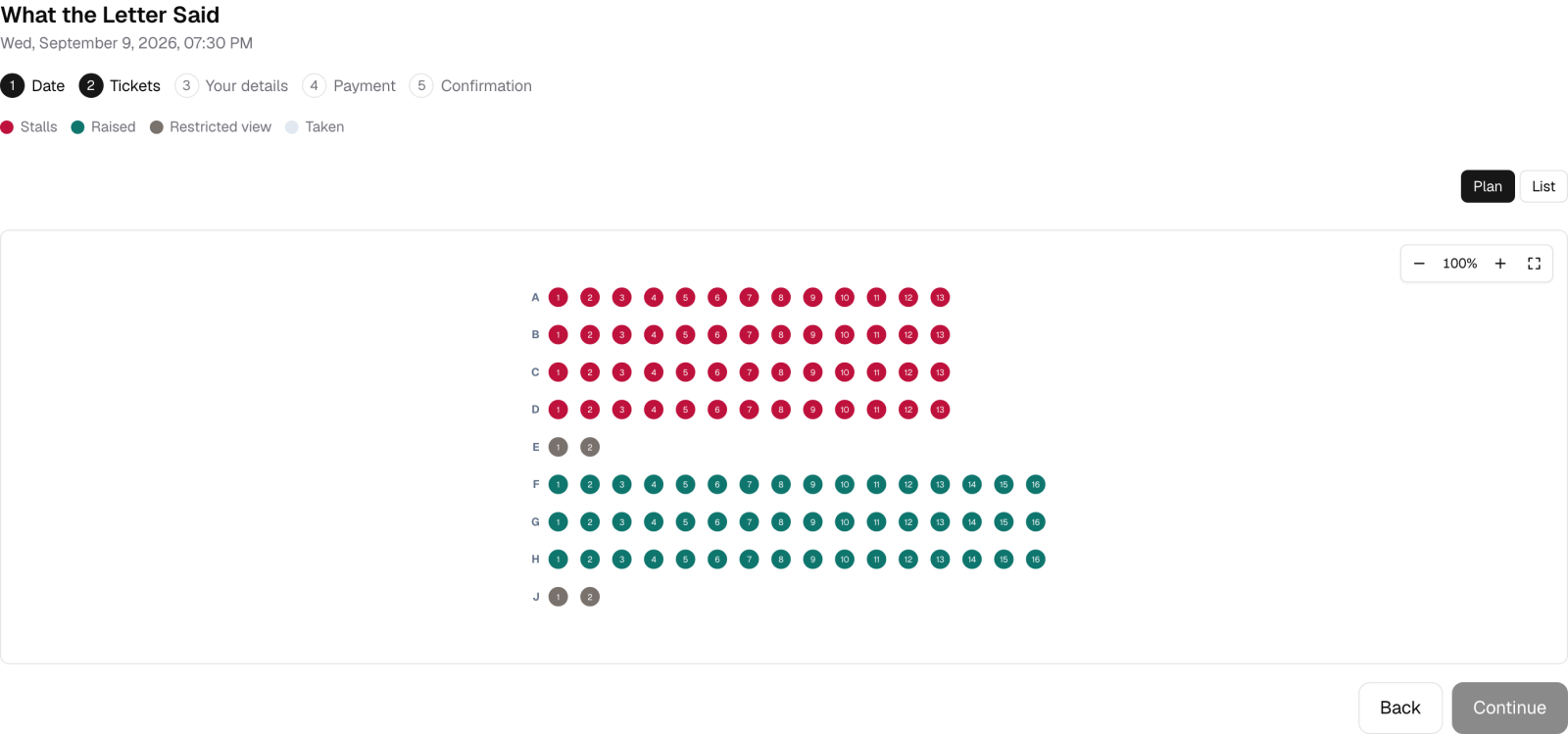
Bands carry colour. The four grey seats are the pillar ones, sitting at opposite ends exactly as they do in the room. Taken seats are greyed out. The customer clicks a chair and the price follows, so nobody reads a dropdown and hopes they picked the right band.
The row letters run A to H and then J, in front of the customer, because that is what their ticket will say.
What stops two people buying the same seat
Two customers click B7 in the same second on press night. Exactly one can have it.
Checking whether the seat is free and then saving it is a race, and races lose. The guarantee has to sit in the database. In our schema it is one line:
UNIQUE KEY `event_seat` (`event_id`, `seat_key`)
One row per seat per night, enforced by MySQL. Both requests reach the insert, one succeeds, and the other gets an error that is the answer. The loser is told the seat has gone and the map redraws with B7 in grey.
Between picking and paying, the chair is held for ten minutes. That hold is a row with an expiry, not a lock. Locks do not survive somebody closing the tab, and a chair held forever by a person who wandered off is worse than one sold twice.
One hall, eighteen nights
The map belongs to the event: one chart, one set of prices, however many performances. Who is sitting in B7 belongs to the date, so Tuesday's B7 and Wednesday's B7 are different chairs with different people in them.
That is the same one event, many dates idea applied to furniture. Cancel one night and you release one night's seats.
What this does not do
We draw rows of seats and tables. That covers most auditoriums, cinemas, lecture halls and function rooms. It does not cover a stadium with curved tiers and a hundred blocks, and if you are ticketing an arena you want arena software.
There is no import of an existing chart. The Bell Room's nine rows took a few minutes. A 900-seat concert hall will take an afternoon, once.
Seating is a paid feature. The free plugin sells by capacity with no limit on events or bookings, which is enough for a room where people sit anywhere.
Go and pick a seat
The theatre demo is live with three weeks of evenings, Saturday matinées and a free Sunday reading.
Open it and try to buy J2. Then look at the same room from the admin, where sold, held and blocked all show at once.
Every screenshot is the running demo, not a mock-up. Seat counts, prices and row letters are read from it. Platform fees are Eventbrite's published organiser rates and Stripe's standard pricing, checked on 2 September 2026; both vary by country. The Events Calendar's hosted seating behaviour is taken from its own documentation.


