Free WordPress event ticketing: what you get, where it stops
2 Sep 2026 · Eventnetic Admin

Most free plugin tiers are shaped to run out. Three events, or fifty bookings, or thirty days, and then a wall.
Eventnetic's free plugin has none of those. No event limit, no booking limit, no time limit. What it does not have is card payments, and that is the honest wall: you can run a whole box office on it as long as people pay at the door.
Here is the full inventory, including one thing a competitor's free tier does better than ours.
What the free plugin does, in full
Everything below works with no licence, forever.
- Events with real ticket types. Adult, child, concession, whatever you sell, each at its own price with its own limit per order.
- Capacity that means something. Set what the room holds. Tickets can share that pool or hold their own stock.
- Bookings and customers. A record per booking, an attendee row per person, and a customer list that is yours.
- Check-in, including the QR scanner. At the door, scan or type the ticket code into the check-in screen and mark people in. This surprises people, because it is usually the first thing behind a paywall.
- Locations and staff.
- Email notifications. Confirmations and reminders through the workflow engine.
- Payment recorded at the door, so the booking and the money stay in step even when the money is cash.
- A dashboard, media library, and appearance settings for the booking page.
That is a working box office. Think of a theatre selling over the phone and taking cards on its own machine. A museum charging at the gate. A class where people pay when they arrive. All of that runs on the free plugin, and always will.
Here is the door end of it. Every ticket carries a code, and the list is searchable and exportable:
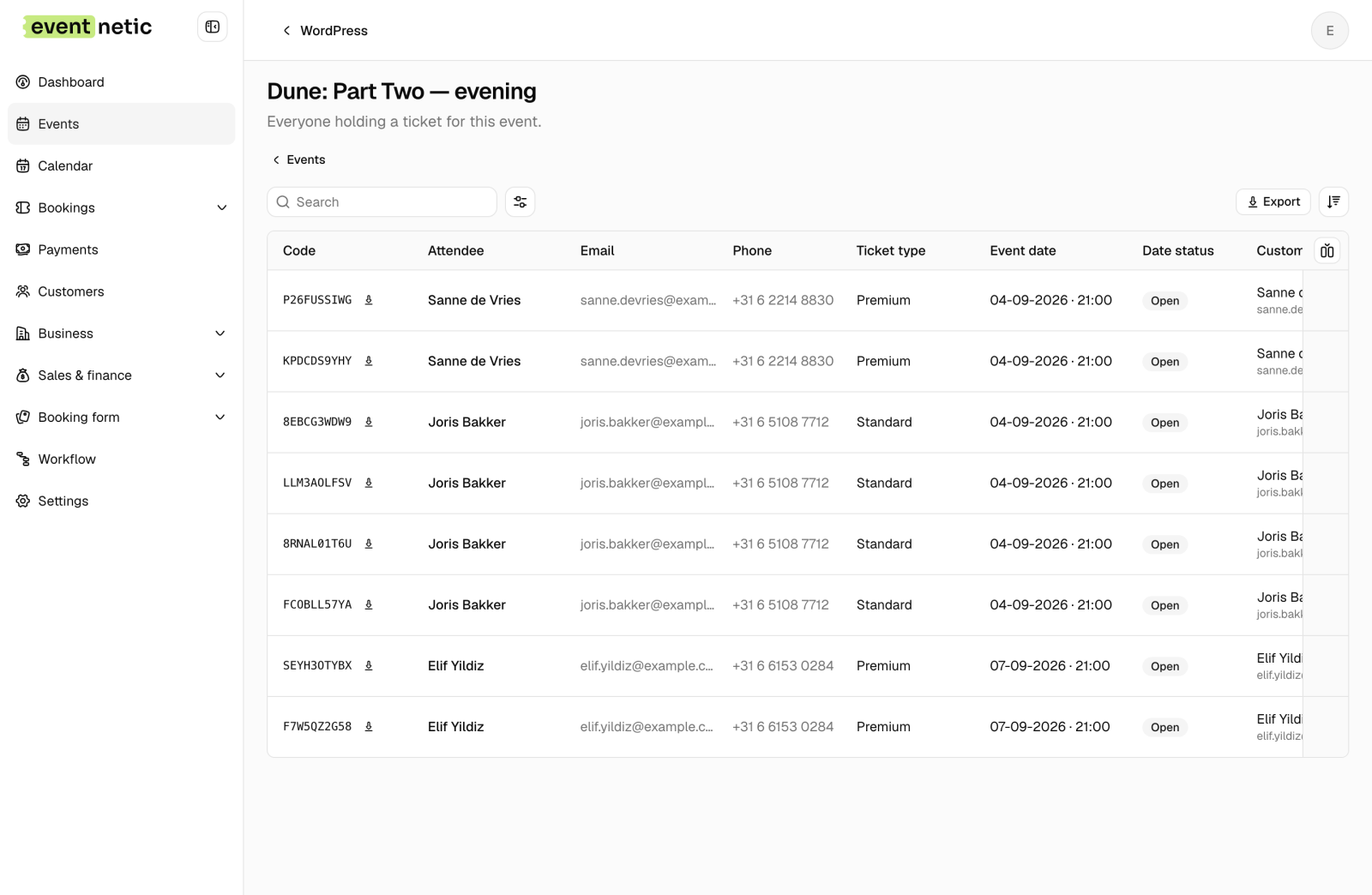
That screen, the scanner that reads those codes, and the customer list behind it are all on the free side of the line.
No event limit, no booking limit, no time limit
Worth saying separately because it is unusual and because it is easy not to believe.
There is no counter anywhere in the free plugin. Not three events, not twenty bookings, not a fourteen-day trial that quietly stops taking money on day fifteen. Run four hundred events through it and nothing changes.
We are saying this plainly because most free tiers are built the other way round, and anyone who has been caught by one is right to check.
Taking money online: what free does not include
This is the wall, and it is a real one.
The free plugin has one payment method: paid at the door. Somebody books, you see the booking, and the money changes hands when they arrive. For a box office that is genuinely enough, and plenty of venues want exactly that.
Card payments are paid. Stripe, PayPal and WooCommerce checkout all sit behind a licence. If your requirement is "somebody buys a ticket at midnight and I never speak to them", the free plugin will not do it.
Where a competitor's free tier beats ours
Event Tickets, the free plugin from the team behind The Events Calendar, includes card payments in its free version through their own checkout, which they call Tickets Commerce. PayPal, Stripe and Paystack, no licence needed.
On that one axis their free tier is straightforwardly better than ours, and if taking money online without paying for software is your requirement, you should go and use it.
We would rather write that sentence than have you discover it after installing. It is also worth knowing what the trade is: their free tier gives you paid checkout, and ours gives you unlimited events, unlimited bookings and QR check-in without one. Which of those matters depends entirely on what you are running.
What you pay for, listed
No vague tiers. This is the whole paid surface:
| Feature | What it is for |
|---|---|
| Card payments | Stripe, PayPal and WooCommerce checkout |
| Repeating dates | One event that runs on many dates, each with its own capacity |
| Seating charts | Rows and tables where the customer picks a specific chair |
| Date-based pricing | A different price on a Saturday than on a Tuesday |
| Coupons | Discount codes with their own limits and history |
| Taxes | VAT and the rest, calculated at checkout |
| Invoices | Proforma and numbered series |
| Custom forms | Extra questions per booking or per attendee |
| Waiting list | Offers going out in order when a place frees up |
| PDF ticket design | Your own ticket layout rather than the default |
| SMS, WhatsApp, Telegram | Notification channels beyond email |
| Webhooks | Sending booking events to something else you run |
| Zoom | Online events with a meeting link per booking |
Repeating dates deserve a note. They are included in every paid plan rather than sold as a tier, because buying the plugin is what buys them. It is also the single most common reason someone outgrows the free version, which is why we wrote a whole post about the model behind it.
When the free plugin is genuinely enough
Not "enough to try". Enough to run on, for years.
- You take money at the door, on your own card machine or in cash. A community hall, a members' club, a school production.
- Your events are one-off. A conference, a launch, an annual dinner.
- People sit wherever they like, so a seat map would be decoration.
- Email is the only notification you need.
If that is you, install it and stop reading. There is no upgrade prompt waiting to spring at event four.
When you will hit the wall
Equally plainly. You will need a licence when:
- You want the money before they arrive. The most common reason by a distance.
- The same thing happens more than once. A weekly class, a nightly show, a daily tour. Repeating dates are paid.
- Seats are worth different money. Any room where the front row costs more.
- You need a receipt with a number on it, or tax on the line, or a discount code.
- You want a text message rather than an email.
Most venues hit the first two within a month of getting serious. That is the honest shape of it, and it is why the free version is a real product rather than a demo: the ceiling is high, but it is a ceiling.
Try it before any of this matters
The fastest way to know is to run a booking through one. We keep five demo businesses live, on the paid features so you can see what is behind the wall, and you can walk any of them end to end without giving us an email address.
One caveat about those demos: they run the paid features, so you are seeing both sides of the line at once. The list above and the booking pages are free. Seat maps, repeating dates and card payments are not.
Open the demo and buy something. Then download the free plugin and see whether the parts you actually need are on the free side of the line. For a lot of venues they are.
The free and paid split above is read from the plugin's own code rather than a marketing page. Event Tickets' free checkout is described from its own documentation, checked on 2 September 2026.


