Cinema ticketing in WordPress: setting up a single-screen cinema
2 Sep 2026 · Eventnetic Admin

A single-screen cinema has a harder ticketing problem than a festival does.
One room, sold three or four times a day, every day, at prices low enough that any per-ticket fee hurts. The 21:00 sells out on a Friday and the 14:00 on the same day does not. Rows 11 to 14 recline and cost more. Students pay half and get their card checked at the door.
This is how to build that in WordPress. Cinema Noord is our demo: one screen, 120 seats, three showings a day, a fortnight on sale. Everything below is a screenshot of it running, and you can open the same site and click the same buttons.
Why the ticketing platforms hurt a cinema in particular
You can put a cinema on Eventbrite or a similar platform this afternoon. It will work. Here is what it costs.
Eventbrite charges organisers 3.7% + $1.79 per ticket as a service fee, then 2.9% per order to process the card. On a €12 cinema seat that is about €0.44, plus €1.79, plus €0.35.
€2.58 on a €12 ticket. Twenty-one per cent.
The fixed €1.79 is what does the damage. It does not care that a cinema seat costs a fifth of a conference pass, so the cheaper your ticket the worse the rate gets. A festival selling €90 passes pays about 6%. You pay 21%.
Now multiply by volume. Cinema Noord runs 38 showings a fortnight. At a modest 45% full that is roughly 4,400 tickets a month:
| A month at 4,400 tickets, €12 each | Platform | Your own site |
|---|---|---|
| Service fee | €9,830 | — |
| Card processing | €1,531 | €2,851 |
| Software | — | €8 |
| Taken off the top | €11,361 | €2,859 |
Stripe's 2.9% + €0.30 is not free either, and a licence is €99 a year, which is about €8 a month. The gap is still roughly €8,500 a month.
Those platform figures are Eventbrite's published organiser rates, which are quoted in dollars and vary by country. Check your own before planning around them. The shape does not change: a fixed fee per ticket is brutal on cheap tickets sold in volume, and cinemas sell nothing else.
Step 1: the room
Start with the place, because every showing points at it. Under Business, add a location: name, address, and a note that front of house will actually use.
Cinema Noord's says: "120 seats. Rows 11 to 14 recline. The ferry from Centraal drops you outside." That last sentence saves somebody a phone call every week.
Step 2: the first showing
Here is the decision the whole schedule rests on, and it is worth getting right before you make 38 of anything.
A showing is an event. A day is a date.
An event carries one clock time across every one of its dates. So "the 21:00, every night this fortnight" is one event with fourteen dates. It is not fourteen events, and the three showings on a Tuesday are not one event with three times.
Add an event, give it the film's name and start time, then open the Dates tab and pick the fortnight:
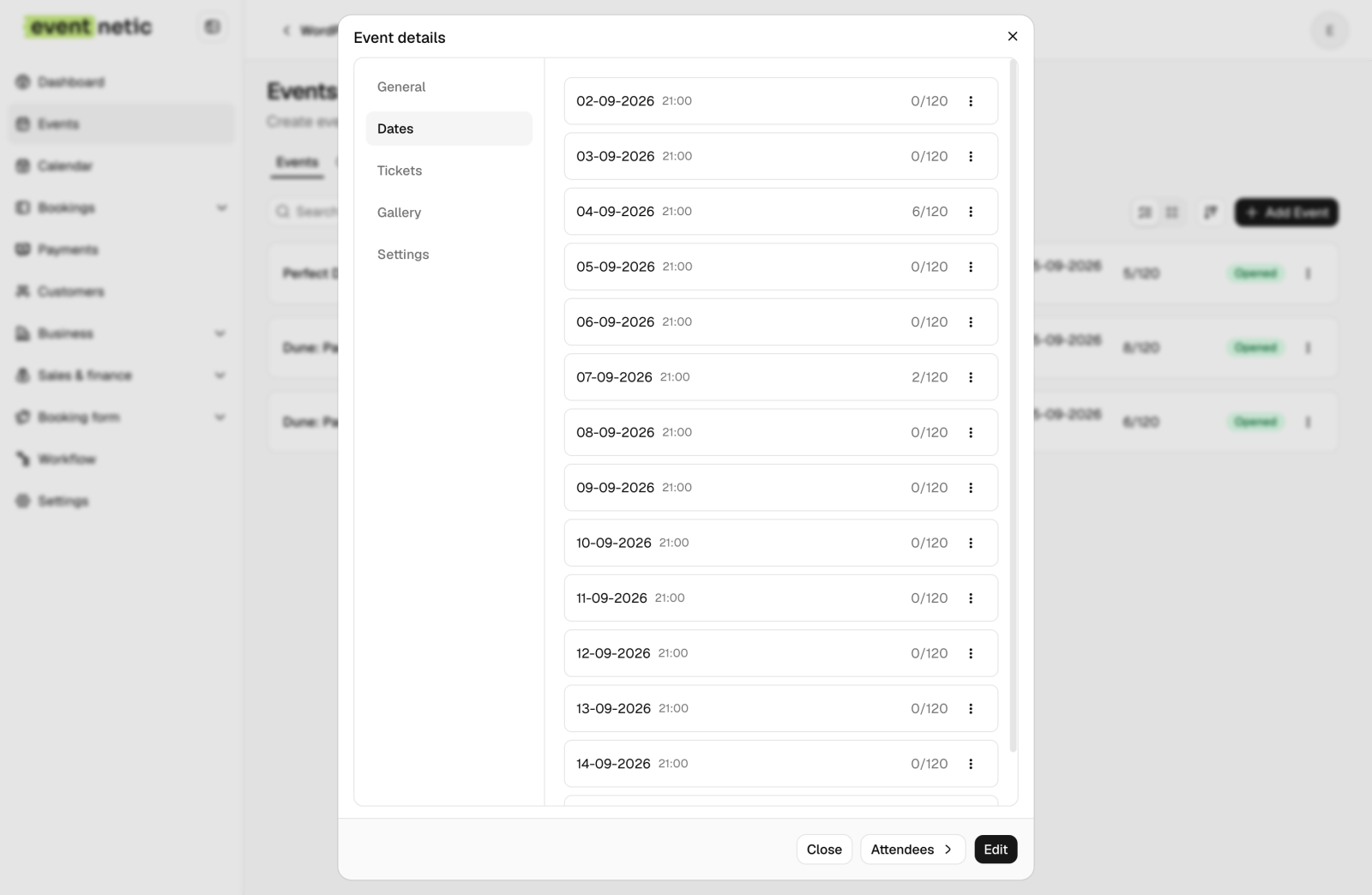
The dates are a list rather than a rule, which matters more than it sounds. Perfect Days runs weekdays only, so its list has ten entries instead of fourteen. Nobody had to write a recurrence pattern with an exception in it, and a bank holiday comes off by unticking a box.
Step 3: ticket types, and which of them share the room
Cinema Noord sells three:
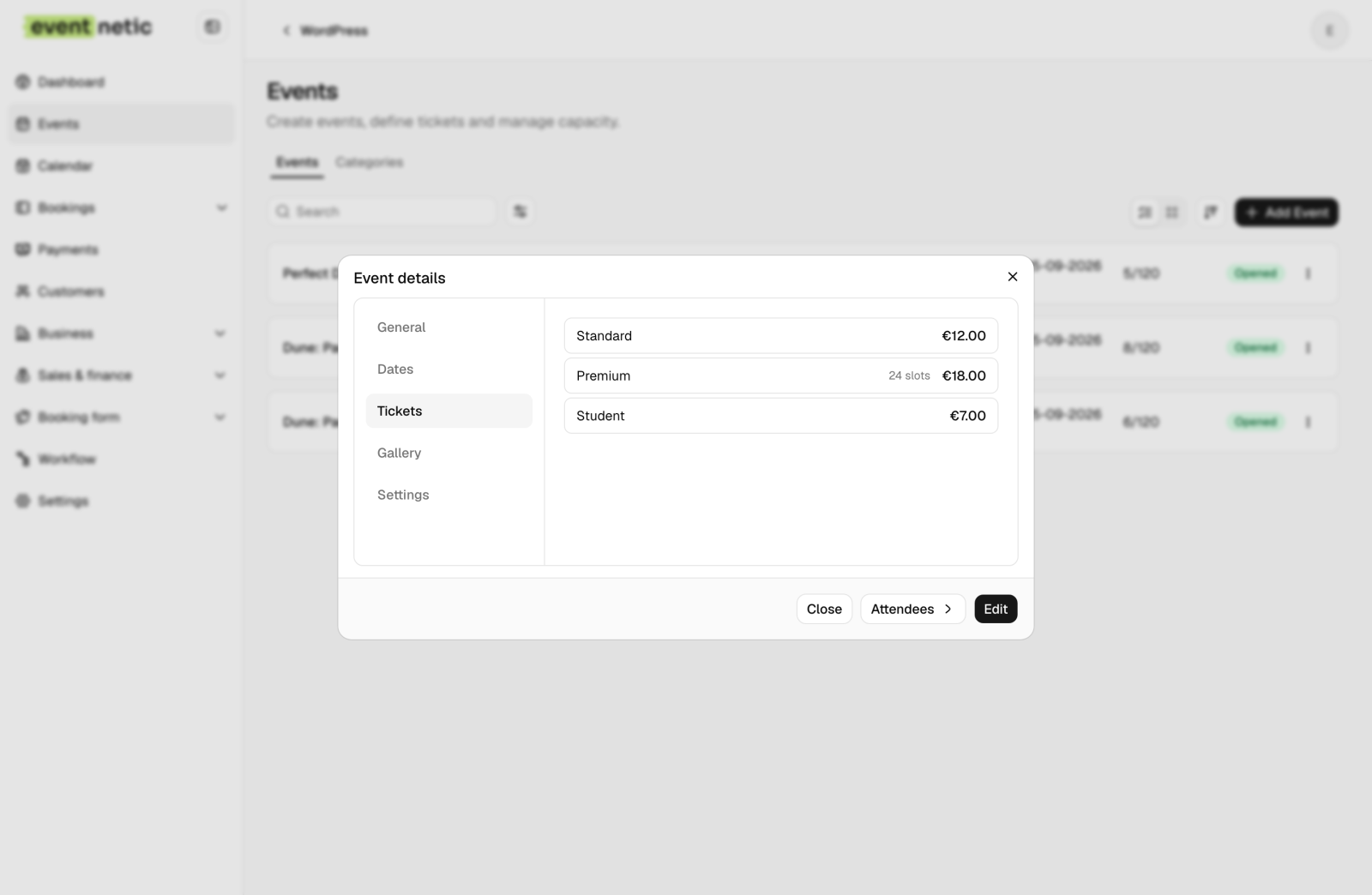
Notice that Premium says 24 slots and the other two say nothing. That is the second decision worth understanding.
Standard and Student are shared: they draw from the room's pool. They are the same physical seats, rows 1 to 10, sold at two prices. A student ticket and a standard ticket both take one of those 96 seats.
Premium is own stock: 24 reclining seats in rows 11 to 14, held separately. If premium came out of the same pool, a busy Friday would sell 96 standard tickets and the good seats would be gone without anybody having paid €18 for one.
So the room is 96 in the pool plus 24 held back, which is the 120 seats that exist. Set the event capacity to what the shared tickets can use, not to the whole building. Own-stock tickets are added on top of it, never carved out of it.
Two more settings do quiet work. Booking is capped at eight seats per order, because a party of twelve on a Friday is worth a phone call. And the student ticket is the only one that collects attendee names, because the name has to match the card at the door. Nobody buying four seats for their family should have to type four names to watch a film.
Step 4: charging more on a Friday
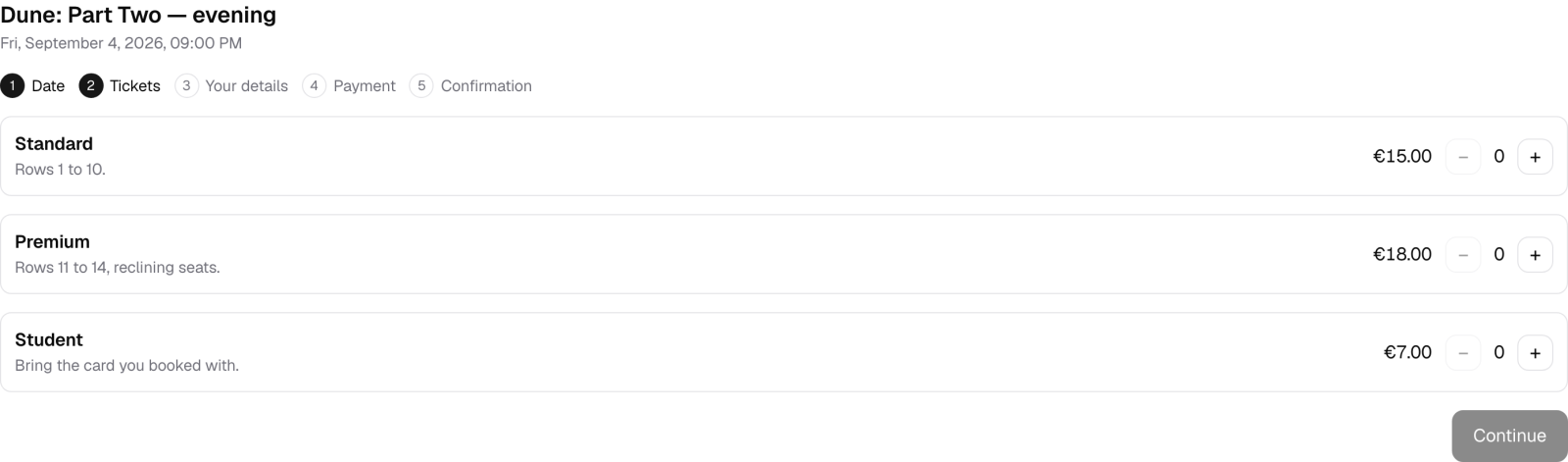
Every cinema charges more at the weekend. On the Dates tab, pick the Fridays and Saturdays and give the standard ticket a different price on those dates.
Here is the same ticket, on the same showing, two nights apart. Friday:
And the Tuesday:
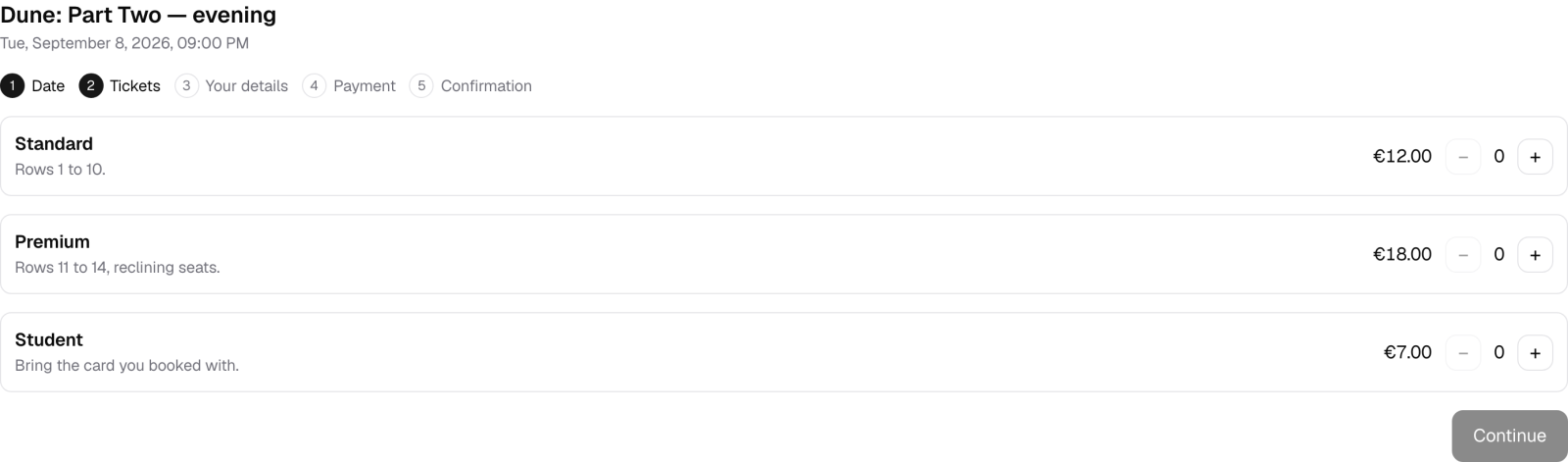
€15 against €12. Premium and student do not move, and neither does the matinée, because a Friday afternoon is not busy.
The price lives on the date rather than on a rule. Nobody wrote "weekends cost more" anywhere, which means Christmas Eve can be priced differently again without unpicking anything.
Step 5: put it on a page
Each showing gets a WordPress page with the booking block on it. Publish, and this is what a visitor sees:
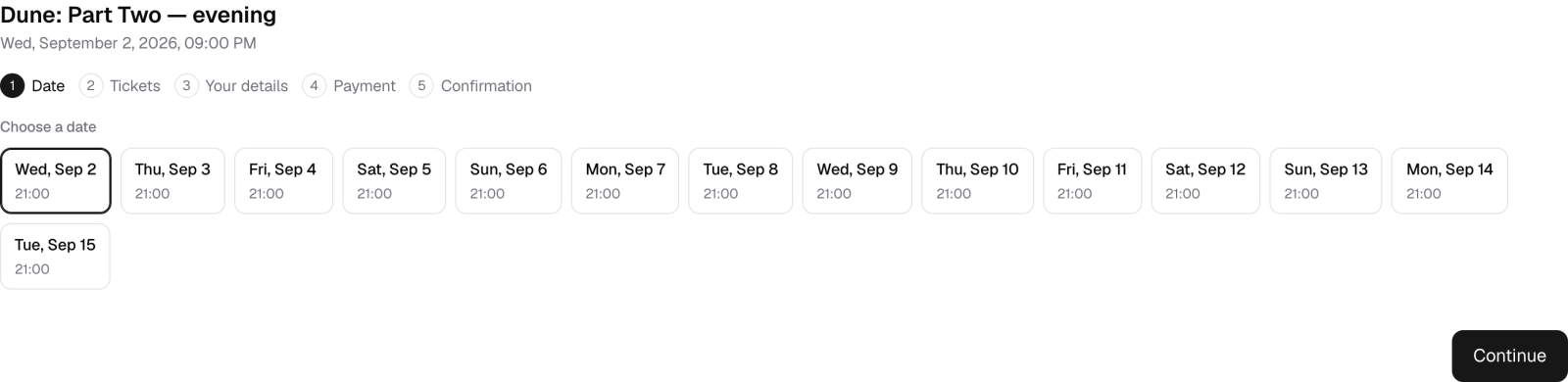
Pick a night, pick tickets, pay, done. The checkout runs on your own site, so nobody is sent to a third-party page to finish, and the email address belongs to you.
Step 6: the other showings
Repeat step 2 for each start time. Cinema Noord has three, so three events:
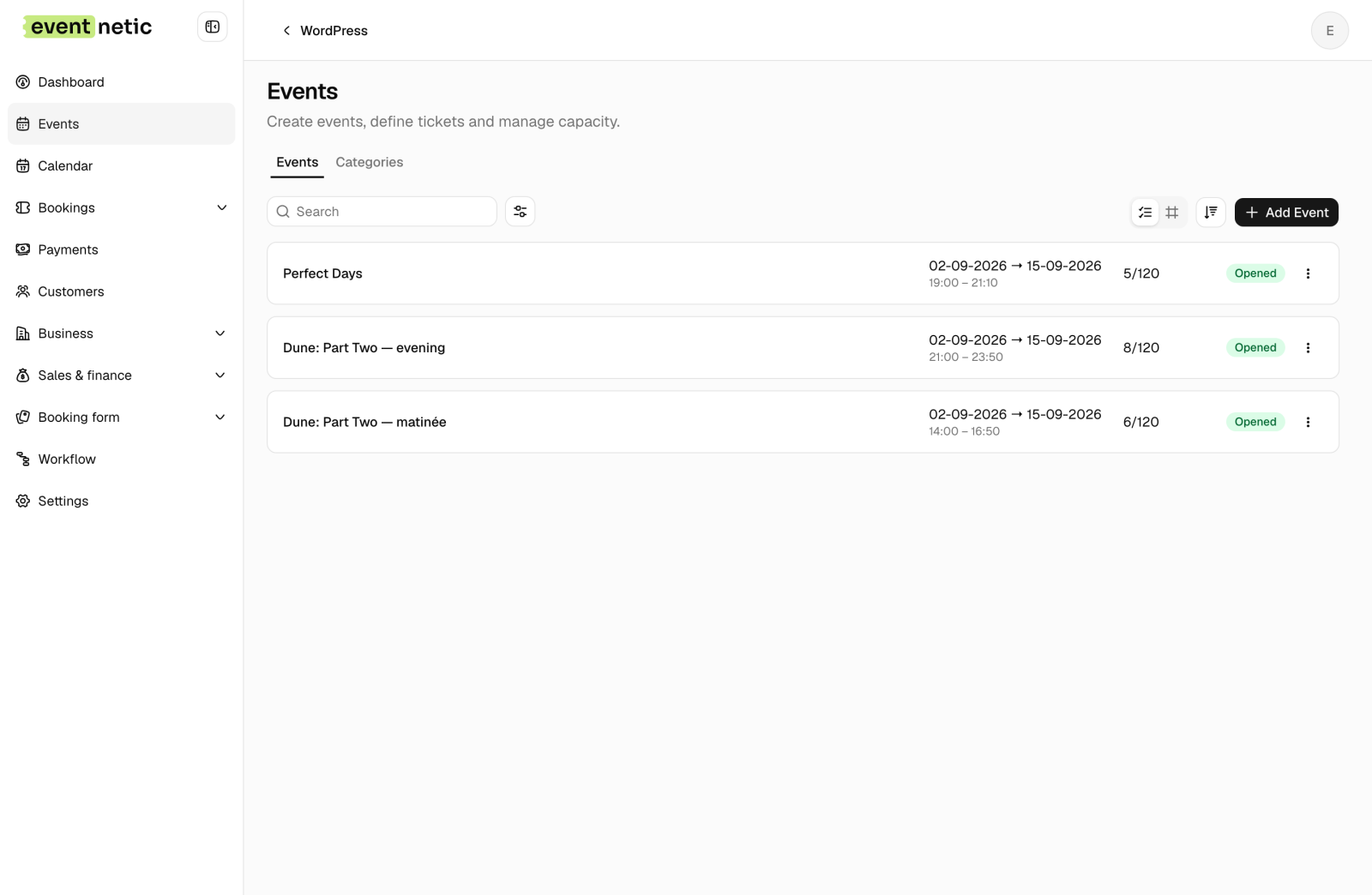
Each holds its own 120 on each of its dates. Selling out the 21:00 on Friday says nothing about the 14:00 on Friday, and nothing about the 21:00 on Saturday. If capacity belonged to the event rather than the date, one sold-out night would close the whole run, and a cinema would notice within a day.
The same film appears twice, at 14:00 and 21:00, and that is correct. They are different showings with different descriptions. The evening one says it sells out first at the weekend.
At the door
Check-in is a browser on a phone. Open the attendee list for tonight's showing, scan the code on the ticket, and the person is marked in. The student list is the one with names on it, which is the list you actually check.
This is in the free plugin, which surprises people, because a scanner is usually the first thing behind a paywall.
What this costs to run
Repeating dates, date-based pricing and card payments are paid features, so a cinema needs a licence. Eventnetic Pro starts at €99 a year.
Against the platform arithmetic at the top of this post, the licence is covered by about 50 tickets. Not 50 a month. Fifty, once, and then the rest of the year runs at Stripe's rate.
The free plugin would run a single premiere night rather than a fortnight of programming, which is a real limit rather than a nudge.
When you want people to pick their seat
Cinema Noord sells by capacity. You buy a standard ticket, you sit in rows 1 to 10, and which seat is whoever got there first.
Plenty of single-screen cinemas work exactly that way. If you allocate every seat instead, that is a seating chart: rows drawn once, price bands, the customer picks a chair. We left it off this demo on purpose, so the cinema and the theatre show two different models rather than the same one twice.
Go and click through it
Cinema Noord is live, with all three showings, a fortnight of dates and a week of bookings already in it. One is unpaid on purpose, because a box office always has a couple of those.
Open the cinema demo and buy a seat on a Friday, then buy the same seat on a Tuesday and watch the price change. Then look at the admin side, where the three showings sit together and each date carries its own count.
Every screenshot is the running demo, not a mock-up. Prices, times and capacities are read from it. Platform fees are Eventbrite's published organiser rates and Stripe's standard pricing, checked on 2 September 2026; both vary by country.


